





AI for Aircraft Maintenance Tracking
Stay on top of aircraft maintenance activities with the help of Veryon AIRE. Specialized AI agents help you find information faster, create records on your behalf, and keep work moving inside Veryon Tracking.
Get a demo of Veryon AIRE for Maintenance Tracking
Just fill out the form and we'll be in touch.
Make better decisions
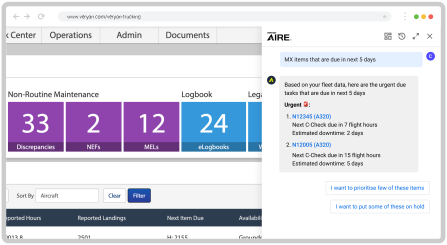
Get instant access to data-driven insights on upcoming maintenance, due tasks, and compliance items, with agent support that helps users find the right information faster.
Boost efficiency
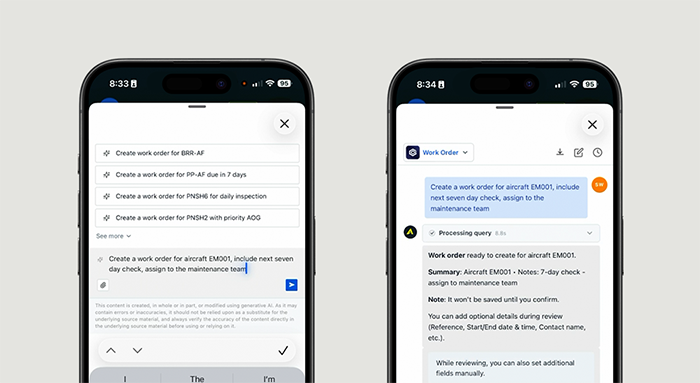
Spend less time on routine tasks with specialized agents that help teams create work orders, manage maintenance items, build eLogbook entries, and keep everyday workflows moving.
Intelligently manage inventory
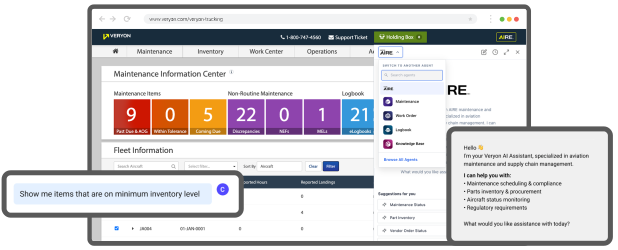
From minimum stock alerts to parts availability, Veryon AIRE helps teams monitor inventory, surface the right information faster, and keep planning and reordering work on track.
Faster, easier adoption
Veryon AIRE’s conversational interface and specialized agents make Veryon Tracking easier to use, helping teams get answers, create records, and move work forward with less back-and-forth.
WHAT IT CAN DO
How Veryon AIRE helps you
Ask Veryon AIRE questions in plain language or use the agent that fits the task.
Veryon AIRE can answer a wide range questions with quick and insightful answers on your everyday tasks. Links are provided to your workflow or record that the answers were generated from, allowing for quick navigation into the details.
Once you have your answers, Work Order, Maintenance, Logbook, and Knowledge Base agents help you create records and move work forward, all without leaving the solution. See some examples of what they can do below:
| MAINTENANCE AGENT |
Help me create a maintenance item for this aircraft
| Veryon AIRE: |
Perfect! I've opened the Create Maintenance Item form for aircraft N1245FD (Pilatus PC-12/45).
The form is now ready for you to complete. Please provide additional details such as:
- Component/equipment (if applicable)
- Item type (Inspection, AD, SB, Part, etc.)
- Description
- Compliance data (dates, hours, cycles, etc.)
- Intervals or next due information
Also, what type of maintenance item would you like to create?
| WORK ORDER AGENT |
Create a work order for this aircraft
| Veryon AIRE: |
Work order ready to create for aircraft N1245FD.
Summary: Aircraft N1245FD
Note: It won't be saved until you confirm.
You can add optional details during review (Reference, Start/End date & time, Contact name, etc.).
While reviewing, you can also set additional fields manually.
REVIEW & CONFIRM
| LOGBOOK AGENT |
Create an eLogbook entry from this file
| Veryon AIRE: |
Great! I can certainly create an eLogbook entry from a file.
Upload the document and include any aircraft, equipment, due date, or priority details, then review and confirm the entry, update work completed and compliance fields, and save it as draft or finalize it.
UPLOAD FILE
| KNOWLEDGE BASE AGENT |
How do I record maintenance completion?
| Veryon AIRE: |
First, you need to close the work order once all required line items have been completed. Here's the process:
- Navigate to Work Orders from the Maintenance dropdown menu
- Open the work order you want to manage
- Select Close Work Order
- You can print a record of the completed work by selecting Print Complete Work Order
This creates a permanent record of the completed maintenance work.
Referenced articles:
Close Work Orders
FAQ
-
What AI agents are available in Veryon Tracking?
Veryon AIRE in Tracking includes Work Order, Maintenance, Logbook, and Knowledge Base agents to help users create records, find documentation, and complete key workflows inside the platform.
-
Who benefits most from Veryon AIRE in Tracking?
While useful for anyone managing aircraft maintenance, the biggest impact is for maintenance controllers/planners, inventory managers, technicians, and quality/compliance teams.
-
How does Veryon AIRE in Tracking work?
Users can ask Veryon AIRE a question in plain language or choose the agent that best matches the task. AIRE then helps surface the right information or guides the user through creating records and completing the next step, all within Veryon Tracking.
-
Does Veryon AIRE collect or use my data?
Interaction data is used only to improve responses. All data is de-identified and never used outside of training the Veryon AIRE model.
-
Can I turn this off for users?
Yes, Veryon AIRE can be disabled at the user level by administrators with the appropriate permissions.
Get started with a demo
See for yourself how Veryon AIRE can improve your maintenance tracking processes. Fill out the form and our team will set up a tailor-made demonstration.
Not ready for a demo?
Reach out to the team with any questions you may have.
How can we help?
Just fill out the form and we'll get in touch.


